If Google asks you to verify a service area business by video, prepare a route through your actual workspace before you start recording. Your video needs to make the business understandable to someone who has never visited it.
A plumber working from home and a photographer traveling to clients will have different things to show. Choose evidence that fits the work you really do, rather than staging a storefront you do not have.
What Google requires from your verification video
Google requires a continuous, unedited recording of at least 30 seconds, captured and uploaded through your Business Profile on a mobile device. For a service area business, show your operating location, evidence of the business, and your authority to manage it. Avoid other people’s faces and sensitive information. See Google’s video verification requirements before recording.
A service area business visits or delivers to customers without receiving them at its own address. If that describes you, keep the address hidden from customers. Google’s service area guidance explains that setup.
Build a recording plan you can follow without stopping
Write a short route on paper, then walk it without filming. You are checking whether you can reach each useful part of the business without putting the phone down or losing sight of what matters.
Start with a location someone can recognize
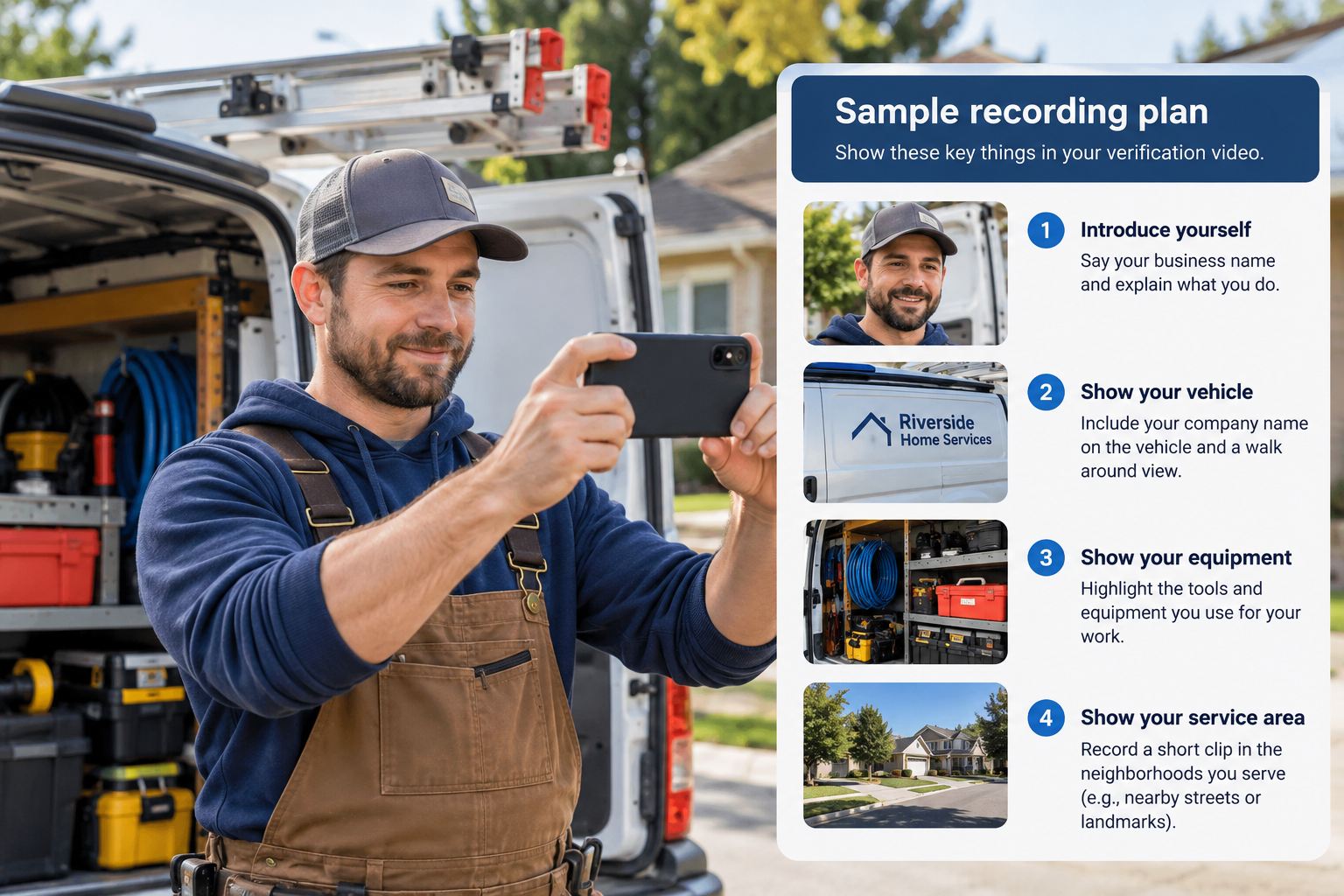
Choose an outdoor starting point where a street sign or another location marker is readable. Avoid a wide shot where the useful detail is too small to see. Check for parked vehicles or people who could block your view while you record.
For a home based business, plan the shortest sensible path from the surrounding area to your work equipment. You do not need to turn your home into a tour. Keep the recording focused on the parts that explain the business.
Show equipment that makes your work clear
Lay out the tools you actually use. A photographer might show camera equipment and the workspace where jobs are prepared. A repair business might show diagnostic equipment or a stocked work vehicle.
Arrange items so you can film them safely. Switch off equipment that would be dangerous to operate while holding a phone, and avoid including customer records in the background.
Make your access to the business visible
Choose an action that demonstrates your control of a business asset, such as unlocking a branded work vehicle. If you use a document as supporting evidence, check what the camera can read before recording. Follow Google’s privacy requirements and avoid exposing account numbers.
A pile of paperwork is difficult to interpret. Select relevant evidence and make the business name readable, without lingering over information that does not help identify the business.
A sample route for a mobile service business
Here is a suggested recording sequence for a business that keeps equipment at home. Adapt it to your setup and the requirements shown in your account.
- Begin outside with a clear location marker.
- Move toward the place where you keep work equipment, maintaining one continuous recording.
- Show the equipment closely enough that its purpose is apparent.
- Demonstrate access to a business asset and include suitable business identification.
- Review the recording for missing evidence or unreadable details before uploading.
Keep a written checklist nearby during your practice walk. Once you begin the actual recording, follow the verification flow in your profile rather than uploading a separately edited promotional video.
What to do if Google rejects the video
Read the rejection details before making another attempt. Note the missing evidence and change your recording plan to address it. Google says the video review can take up to five business days; check the result in your profile.
Keep a brief record of the submission date and any message you receive. If the available verification methods do not resolve the issue, use Google’s verification help to find the next step. Do not create a second listing to work around the problem.
Questions about service area video verification
Do I need a storefront or a branded van?
A service area business can be eligible without a storefront. Google’s requirements allow different evidence of your work and management access; a branded vehicle is an example, not the only possible evidence.
Can I choose a different verification method?
Use the options Google offers in your account. Its verification guidance explains that available methods are determined automatically.
Keep your profile useful after verification
Verification is followed by the regular work of maintaining your profile. If your images are missing, read our guide to cover photos that are not showing.
Moose Marketing Group helps Oklahoma City area businesses maintain their Google profiles. Tell us what is happening with your profile so we can discuss the support you need.